Windows 10 QuickTip #5 Zoom in and Zoom out on Your Web Browser
How to zoom in and out on your computer's web browser so you can see better

Kevin Stevenson
It is a very simple task to zoom in and out on your computer and will help you tremendously at reading or seeing whatever you need
How To:
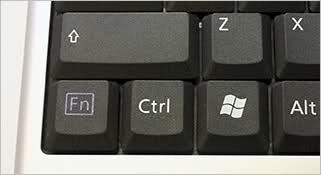
Locate the Ctrl key on your keyboard. It will look the picture included down below.
Zoom In
You will want to press the ctrl and the + key on your keyboard to zoom. The key is located at the top near the backspace key or if you have a numpad included with your keyboard you can locate it on the numpad.
Zoom Out
You will want to press the ctrl key and the - key on your keyboard to zoom. The key is located at the top near the backspace key and to the left of the + key or if you have a numpad included with your keyboard you can locate it on the numpad.
Check out the video on our instagram to see an example of it being used.
This Article has been Republished with Permission from PhasedLogix